
Perfect365: Face Makeup Editor
Perfect365, Inc.Beauty
3.547.56K Reviews
- Version
- 10.33.22
- Installs
- 50.00M
- Age Rating
- Everyone
Screenshots
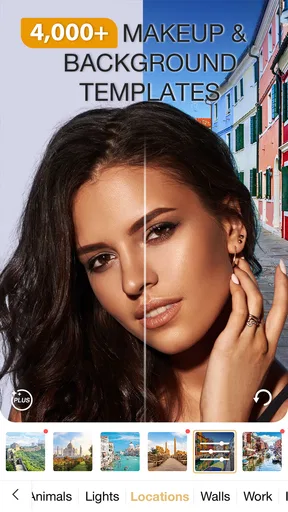
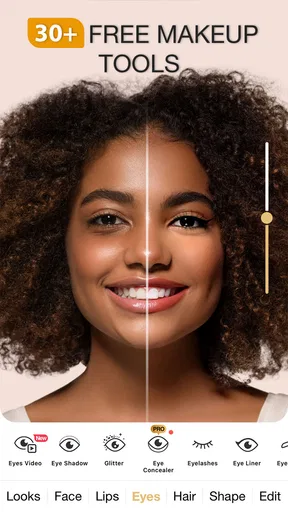
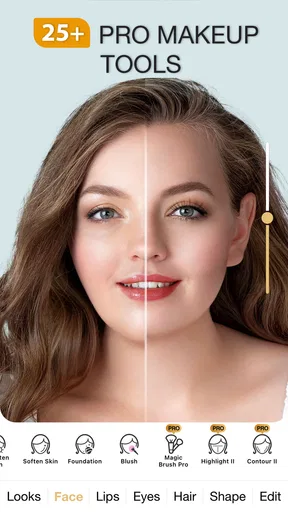
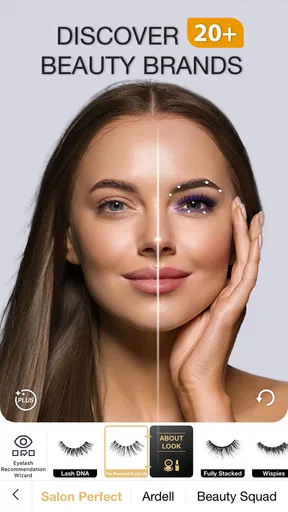
Our Review of Perfect365: Face Makeup Editor
 Analysis by Appyee
I judge a beauty editor less by how dramatic its filters can look and more by whether I can make a small, deliberate change without losing the photo I started with. Perfect365 Makeup Photo Editor is aimed at that kind of playful experimentation: it lets me explore makeup looks on a portrait before deciding whether a style suits me. I’d treat it as a creative tool for selfies and beauty ideas, rather than a substitute for trying makeup in person.
Finding a comfortable way around the editor
When I first opened the app, I was greeted with a user-friendly interface that didn’t intimidate me with too many options. The design is sleek and intuitive, which is great because who wants to spend ages figuring out how to use an app when you could be enhancing your photos instead?
That simplicity is helpful if you only want to make one quick adjustment, but it also matters for people who prefer to learn an editor gradually. I’d start with a preset, see what changes, and then explore individual controls only when there’s a clear reason. This keeps the session manageable and makes it easier to tell which choice created the result I like.
The app is a free beauty app from Perfect365, Inc., with a 3.6 average from around 769,000 ratings and more than 50 million installs. It’s rated for everyone, and version 10.15.23 supports devices running Android 8.0 or later. Those details make it easy to understand its broad reach, though they don’t tell me whether every control will feel comfortable on every screen or for every user.
Trying looks without making the photo feel unlike you
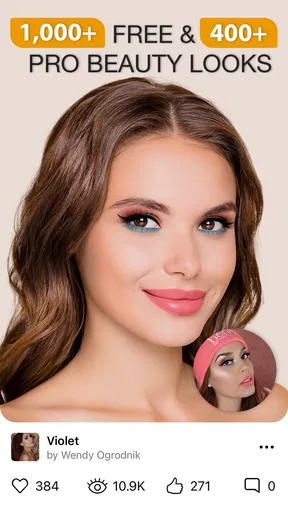
The app offers a plethora of makeup styles, from subtle to bold, which are perfect for any occasion. Whether you’re prepping for a virtual meeting or just want to see how you’d look with a dramatic cat eye, Perfect365 Makeup Photo Editor has got you covered.
One of the standout features of this app is its ability to personalize your makeup looks. You can choose from pre-set styles or mix and match different elements to create something uniquely you. It’s like having a personal makeup artist who never says no!
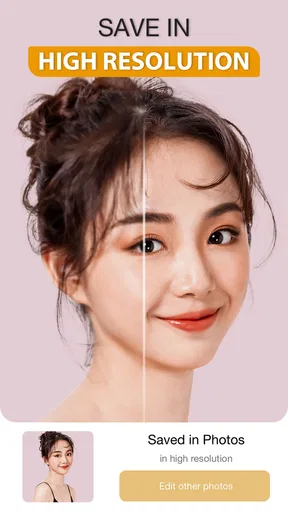
The app also includes a feature to adjust skin tone, which I found incredibly handy. It’s not just about adding makeup; it’s about enhancing your natural beauty. The skin softening tool is subtle and doesn’t give you that weird, plastic look that some other apps do.
For a more believable result, I’d use the lightest touch that achieves the effect I’m after, especially when changing skin tone or smoothing. A useful check is to compare the edited portrait with the original before sharing: does the face still look like the person in the photo, and does the makeup fit the lighting? That pause helps me avoid mistaking a strong filter for a natural-looking edit.
Small adjustments and a practical try-on routine
Another feature worth mentioning is the detailed customization. You can tweak each aspect of your makeup—from the intensity of your blush to the shade of your lipstick. This level of detail is what sets Perfect365 Makeup Photo Editor apart from the rest.
The virtual try-on feature is a game-changer. You can see how different styles look on you in real-time. It’s perfect for those moments when you’re sitting in front of your mirror thinking, "What if I tried something different?" Now, you can see the results instantly without committing to anything.
I find this most useful as a decision aid, not a promise of exactly how a product will look in real life. A screen preview can help narrow down whether I prefer a softer lip or a stronger eye, but a photo’s lighting and angle influence what I see. If I’m comparing two options, I’d keep the same portrait and change one detail at a time; otherwise, it’s too easy to confuse the makeup change with a change in lighting or pose.
For someone learning what styles they like, that one-change-at-a-time approach also makes the editor easier to navigate. It reduces the number of controls to think about at once, which can be helpful if dense visual interfaces are tiring or if precise tapping is difficult. I’d take breaks rather than trying to perfect every detail in one sitting.
Making it fit into an ordinary day
A realistic use for me would be getting ready for a video call, taking a quick portrait in the window light, and testing a restrained look before deciding whether I want to recreate it with actual makeup. I could also use a saved favorite as a starting point for a later photo, then adjust the details instead of rebuilding the look from scratch. This is more convenient than applying and removing makeup just to compare ideas, though the preview remains a digital approximation.
For makeup inspiration, the app is more hands-on than browsing a static gallery because I can experiment on a portrait and refine individual elements. Compared with a general photo editor, its beauty focus is the advantage when I want to adjust makeup rather than crop, retouch a whole scene, or make broad color corrections. If my goal is extensive image editing or a consistent professional workflow, I’d reach for a broader editor instead; Perfect365’s appeal is the focused, approachable try-on experience.
For those who love to stay on top of trends, the app offers new styles updated regularly. This means you can constantly try out the latest looks without ever having to leave your home. Plus, there’s a handy option to save your favorite looks for easy access later.
Those features make repeat visits more useful than a one-off novelty session: I can keep a look I like and return to it when I want a familiar starting point. I’d still review each new portrait separately, because a style that works on one angle or in one kind of light may not suit another. Saved looks are a shortcut, not a guarantee that the same settings will flatter every image.
Sharing, learning, and choosing when to stop
Once you’ve crafted your perfect look, sharing your masterpiece is a breeze. The app integrates seamlessly with social media platforms, so you can show off your new look to friends and followers in just a few taps. It’s also a fun way to get feedback or suggestions from your network.
And if you’re someone who loves feedback, the app has a community feature where you can share your looks and get inspired by others. It’s like a social network just for beauty enthusiasts.
I’d use sharing selectively. A beauty edit can be personal, and not every experiment needs to become a public post; saving a result for myself is just as valid. If I’m asking friends for feedback, I’d show the original alongside the edited version so they can comment on the actual change rather than the overall portrait. That makes the feedback more useful and keeps expectations grounded.
People who have difficulty distinguishing subtle shades may find fine makeup comparisons less useful on a particular display, while someone who relies on precise touch may prefer broad, simple adjustments over extended tweaking. The app’s straightforward first impression helps, but it doesn’t remove those practical limits. I’d choose a larger screen or take more time if small on-screen controls make a session uncomfortable.
Costs, fit, and the limits of a beauty editor
The app is free to download, with optional in-app purchases ranging from $0.99 to $19.99 per item. I’d begin with the free experience and decide whether I actually need anything beyond it before spending. The paid options are worth considering only if they solve a specific need for me; I wouldn’t assume I need to buy something just to try a basic look.
With around 49,000 written reviews alongside its large rating base, the app has clearly reached many beauty-editor users, but popularity alone doesn’t tell me whether it fits my tastes. I’d recommend it to people who enjoy selfies, want a low-pressure way to explore makeup combinations, or need a quick visual starting point before getting ready. I’d skip it if I want a natural camera image with no beauty processing, find portrait retouching uncomfortable, or need a full-featured editor for non-beauty work.
There’s also a difference between testing a makeup idea and judging a real product. The editor can help me decide what general style I like, but it can’t tell me how a formula feels, wears, or looks under every kind of light. For shopping decisions, I’d treat the preview as inspiration and use real swatches or in-person testing when that distinction matters.
My take after weighing the trade-offs
Overall, Perfect365 Makeup Photo Editor is a fun and engaging app that makes experimenting with makeup easy and accessible. Whether you’re a makeup newbie or a seasoned pro, there’s something here for everyone. The options are vast, the features are robust, and the interface is easy to navigate.
My recommendation comes with a clear boundary: it’s best when I want to explore looks, make a portrait feel polished, or gather ideas without committing to a real makeup routine. It is less suited to someone who wants every edit to remain completely untouched or who needs fine control over an entire image. Used thoughtfully, its presets, custom adjustments, saved looks, and try-on experience give me several ways to experiment without turning the process into a chore.
If you haven’t tried it yet, I recommend giving it a go. Even if you’re just in it for fun, it’s a great way to explore styles and trends without any pressure. Plus, who doesn’t love a good selfie?
So, grab your phone, download the app, and get ready to transform your photos with just a few taps. Happy glam time!
Privacy and Permissions
See what permissions an app requests and how it handles your data.
- Device & app history
- retrieve running apps
- Phone
- read phone status and identity
- Photos/Media/Files
- read the contents of your USB storage, modify or delete the contents of your USB storage
- Storage
- read the contents of your USB storage, modify or delete the contents of your USB storage
- Camera
- take pictures and videos
- Microphone
- record audio
- Wi-Fi connection information
- view Wi-Fi connections
- Device ID & call information
- read phone status and identity
- Other
- view network connections, create accounts and set passwords, read battery statistics, change network connectivity, connect and disconnect from Wi-Fi, disable your screen lock, expand/collapse status bar, full network access, read sync settings, run at startup, reorder running apps, use accounts on the device, control vibration, prevent device from sleeping, toggle sync on and off, set an alarm, Google Play license check, read Google service configuration
Verdict
Strengths of Perfect365: Face Makeup Editor
- Easy-to-use interface for quick edits.
- Wide range of makeup styles and colors.
- Real-time makeup application previews.
- Customizable tools for precise adjustments.
- Regular updates with new features.
Limitations of Perfect365: Face Makeup Editor
- In-app purchases can be costly.
- Some features require a subscription.
- Occasional ads interrupt editing.
- Performance issues on older devices.
- Limited free options compared to paid.
Similar Picks in This Category
View All
Beauty Makeup Editor & Camera
Photo & Video Editors - Instant Solution4.7

Mirror Plus - HD Mirror app
Digitalchemy, LLC4.8

Cute Lock Screen & Wallpapers
Prometheus Interactive LLC4.6

HD Camera for Android
One Music Player4.5

Phone Mirror app - True Mirror
Cards4.6

Beauty Camera: Sweet Camera
Mobile_V54.6
Frequently Asked Questions
What is Perfect365 Makeup Photo Editor?
Perfect365 Makeup Photo Editor is a virtual makeover app that allows users to experiment with different makeup styles and beauty looks directly on their photos. It offers a wide range of customizable features, from lipstick colors to eye shadows, making it easy for users to find the perfect look without the need for physical makeup products.
Is Perfect365 Makeup Photo Editor free to use?
Yes, Perfect365 is free to download and use, offering a variety of basic features at no cost. However, it also offers premium features and additional content available through in-app purchases or a subscription model. This allows users to access more advanced tools and exclusive beauty looks.
How user-friendly is Perfect365 Makeup Photo Editor?
Perfect365 is designed with user-friendliness in mind, featuring an intuitive interface that makes it easy for both beginners and advanced users to navigate. The app provides step-by-step guides and tutorials for applying virtual makeup, ensuring that users can achieve professional results without any previous experience.
Does Perfect365 Makeup Photo Editor require an internet connection?
While Perfect365 can be used offline for basic editing, an internet connection is required to access certain features such as downloading new makeup looks, updates, and sharing edited photos directly on social media platforms. For the best experience, having a stable internet connection is recommended.
Can Perfect365 Makeup Photo Editor handle different skin tones and types?
Yes, Perfect365 is designed to accommodate a wide range of skin tones and types. The app offers customizable options to adjust makeup colors and textures, ensuring realistic and flattering results for every user. Additionally, it includes tools to address common skin concerns, like blemishes and uneven tones.
